
Share
%201.webp)


By:
Hans Allí

5 Reasons Your Website Isn't Generating Leads (And How to Fix It)
Your Website Looks Fine. So Why Isn't It Converting?
You spent good money on a website. It loads, it looks presentable, it has your phone number somewhere on it. But the inquiries aren't coming in. The contact form collects dust. You're getting traffic from Google, maybe even running ads, and still nothing meaningful happens when people land on your site.
This is one of the most common problems we see after auditing hundreds of business websites over the past decade. The site exists, but it doesn't work. It's a digital brochure sitting in a waiting room that nobody visits twice.
The good news: the reasons are almost always fixable. Here are the five we see most often, along with what to do about each one.
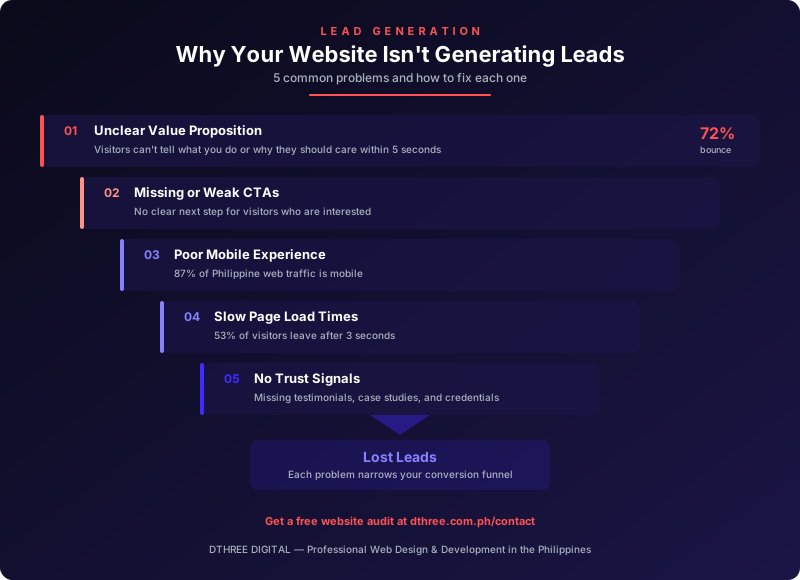
1. Your Value Proposition Is Unclear (or Missing Entirely)
The Problem
A visitor lands on your homepage. Within three to five seconds, they need to understand what you do, who you do it for, and why they should care. If your headline says something vague like "Innovative Solutions for a Better Tomorrow" or "Welcome to [Company Name]," you've already lost them.
We've reviewed sites where the company's actual service offering was buried three clicks deep, behind a wall of corporate jargon. The homepage was all mission statements and stock photos. No clear answer to the only question that matters: what do you do, and how does it help me?
This is especially common among Philippine businesses that treat their website like a company profile rather than a sales tool. The "About Us" page gets all the attention. The homepage gets a slideshow of the office building.
The Fix
- Lead with a clear headline. State what you do and for whom in plain language. "We design and build websites that generate leads for Philippine businesses" is infinitely better than "Your Partner in Digital Transformation."
- Add a supporting subheadline. One sentence that reinforces your credibility or differentiator. Example: "10 years, 500+ projects, from startups to publicly listed companies."
- Make it visible above the fold. Your value proposition should be the first thing people read, not something they have to scroll to find.
- Test it on someone unfamiliar with your business. Show them your homepage for five seconds, then ask what the company does. If they can't answer, rewrite it.
2. Your Calls to Action Are Weak, Hidden, or Nonexistent
The Problem
You'd be surprised how many business websites have no clear next step for the visitor. There's no "Get a Quote" button. No "Book a Consultation" link. The contact page exists, but nothing on the site actively directs people toward it.
Or worse: the CTA is there, but it says "Submit" or "Click Here." These are not compelling reasons to act. They're leftover placeholder text that never got replaced.
Some sites bury the contact form at the bottom of a page that requires four scrolls to reach. Others put a phone number in the footer in 11px font and call it a day. If you're making visitors work to reach you, most of them simply won't.
The Fix
- Place a primary CTA above the fold on every key page. Homepage, services page, about page. Every page that gets traffic should have a visible path to conversion.
- Use action-oriented, specific language. "Get a Free Website Audit" outperforms "Contact Us" every time. Tell people what they'll get, not just what to do.
- Add secondary CTAs throughout long pages. If someone reads halfway through your services page and feels convinced, don't make them scroll back up. Put another button right there.
- Make buttons visually distinct. A CTA that blends into the page design isn't a CTA. Use contrasting colors, adequate size, and enough whitespace around it to draw the eye.
- Reduce friction in your forms. Every extra field you add reduces completion rates. Name, email, and a short message are enough for an initial inquiry. You can qualify the lead on the follow-up call.
3. Your Mobile Experience Is an Afterthought
The Problem
In the Philippines, mobile internet usage consistently accounts for over 70% of web traffic. For many local businesses, that number is even higher. If your website doesn't work well on a phone, you're ignoring the majority of your potential customers.
"Works on mobile" and "works well on mobile" are very different things. We regularly audit sites that technically respond to smaller screens but deliver a frustrating experience: text too small to read, buttons too close together to tap accurately, images that push content off-screen, and navigation menus that require a PhD to operate.
There's also the layout problem. A desktop design that gets squeezed into a mobile viewport often hides CTAs, breaks forms, or makes key information inaccessible without excessive pinching and scrolling. Google has used mobile-first indexing for years now. A poor mobile experience doesn't just lose visitors. It hurts your search rankings.
The Fix
- Design mobile-first, not mobile-also. Start with the small screen and scale up. This forces you to prioritize content and actions rather than cramming everything in.
- Test on actual devices. Browser emulators are useful but imperfect. Load your site on a mid-range Android phone (the most common device in the Philippine market) and try to complete a conversion. Note every point of friction.
- Make tap targets large enough. Buttons should be at least 44x44 pixels. Links in body text should have enough spacing that users don't accidentally tap the wrong one.
- Simplify mobile navigation. A clean hamburger menu with clearly labeled items works. A mega menu crammed into a mobile drawer does not.
- Ensure forms are usable on mobile. Use appropriate input types (email, tel, number) so the correct keyboard appears. Make fields full-width. Don't require a date picker that was designed for a mouse.
If your site was built more than three or four years ago and hasn't been updated since, this is likely a significant issue. Check our post on 10 signs your business website needs a redesign for a broader diagnostic.
4. Your Site Is Too Slow
The Problem
Page speed has a direct, measurable impact on conversions. Research from Google shows that as page load time increases from one second to three seconds, bounce probability increases by 32%. At five seconds, it jumps to 90%. People don't wait.
In the Philippine context, this matters even more. While connectivity has improved significantly, many users are still on mobile data with variable speeds. A site optimized for a fiber connection in a Makati office may perform terribly for a user on an LTE connection in Cebu or Davao.
Common culprits we encounter during audits: uncompressed images (a single hero image at 4MB is not unusual), excessive plugins on WordPress sites, unoptimized code, no caching, and cheap shared hosting that buckles under moderate traffic.
The Fix
- Run a PageSpeed Insights test right now. Go to pagespeed.web.dev, enter your URL, and check both mobile and desktop scores. Anything below 50 on mobile needs immediate attention.
- Compress and properly size your images. This single fix often produces the biggest improvement. Use WebP format where possible. No image on a standard webpage needs to be more than 200KB.
- Audit your plugins and scripts. WordPress sites are notorious for this. Every plugin adds weight. Remove anything you're not actively using. Review what's loading on each page and eliminate unnecessary scripts.
- Implement caching. Browser caching and server-side caching reduce load times for returning visitors dramatically. Most modern hosting platforms and CMS tools support this with minimal configuration.
- Consider your hosting. A PHP 200 per month shared hosting plan might save money upfront, but if it's costing you leads because the site takes eight seconds to load, that's a bad trade.
5. Your Site Has No Trust Signals
The Problem
Filipinos are relationship-driven buyers. Before someone fills out your contact form or calls your number, they need to feel confident that you're legitimate, competent, and worth their time. Your website needs to earn that confidence quickly.
Many business websites skip this entirely. No client logos, no testimonials, no case studies, no team photos, no proof of any kind that the business has actually done what it claims to do. The site says "We are a trusted partner" but provides zero evidence to support that statement.
This is particularly damaging for service-based businesses. If you're asking someone to spend five or six figures on your services, "trust us" is not a strategy. You need to show your work.
The Fix
- Add client logos. Even five or six recognizable logos create instant credibility. Get permission from your clients and display them prominently on your homepage.
- Include real testimonials with names and context. "Great service! - J.R." means nothing. "Dthree redesigned our website and our monthly inquiries increased by 300% within the first quarter. - Juan Reyes, Marketing Director, [Company Name]" means everything.
- Publish case studies. Pick your two or three best projects and tell the story: what was the problem, what did you do, what were the results. Numbers make it real. See our case study on how a website redesign increased leads for an example of this in action.
- Show your team. A photo of real people builds more trust than any stock image. It signals that there are actual humans behind the business.
- Display relevant certifications, awards, or affiliations. Google Partner badges, industry association memberships, media features. If you've earned them, show them.
- Add an SSL certificate. This should go without saying in 2026, but we still encounter business sites without HTTPS. Browsers flag these as "Not Secure," and that warning alone is enough to send a visitor away.
These Problems Compound Each Other
Here's what makes this tricky: these five issues rarely exist in isolation. A site with a weak value proposition and no CTAs on a slow mobile experience with no trust signals isn't losing leads in one place. It's losing them everywhere, at every stage of the visitor's decision-making process.
The visitor arrives, doesn't understand what you offer, can't find a reason to trust you, gets frustrated by load times on their phone, sees no clear action to take, and leaves. That's not one lost lead. That's a system failure.
The upside is that fixing these issues produces compounding returns. Improving your value proposition means more visitors stay. Better CTAs mean more of those visitors take action. Faster load times and a good mobile experience reduce drop-off. Trust signals increase the likelihood that someone actually completes the form. Each improvement amplifies the others.
What to Do Next
Start with an honest assessment. Open your website on your phone right now. Read it as if you've never heard of your company. Ask yourself:
- Can I tell what this business does within five seconds?
- Do I see a clear, compelling reason to make contact?
- Does the site load quickly and work smoothly on my phone?
- Do I trust this business based on what the site shows me?
If the answer to any of those is no, you've identified where to start.
If you want a professional evaluation, we offer website audits that diagnose exactly where your site is losing potential customers and what to fix first for the biggest impact. We've done this for over 500 businesses in the past decade. The patterns are consistent, and the fixes work.
Get in touch and let's look at what your website should be doing for your business.
.webp)